DSB-500 (DU-A2)
Frequently Asked
Questions (FAQ)
Why doesn't my DSB-500 (DU-A2) work in Windows 2000?
If after the installation of DSB-500 in Windows 2000 you see Unsupported VIA USB Universal Host Controller in Device Manager please try the following:
1. Open Control Panel > System > Hardware > Device Manager > Universal
Serial Bus Controllers.
2. Double-click on Unsupported VIA USB Universal Host Controller. Select Driver >
Update Driver > Select "Display a list of the know drivers...." > Select
VIA USB Universal Host Controller.
3. System will add Root Hub and VIA USB Universal Host Controller in the
Universal Serial Bus Controllers.
If you will not be able to use the drivers which are built-in please click
on the link provided to download drivers. The drivers are contained in an
executable file. Windows 2000 may require you to reinstall the DSB-500
after the drivers are updated. Follow the installation procedure normally
and reboot your computer if instructed to do so. If the DSB-500 is still
not working, reboot your computer with the DSB-500 installed.
Follow the instructions to install the new drivers.
- Download the new driver
contained in the file usbf108.exe. For your convenience, D-Link
recommends that you create a folder and then download usbf108.exe into
that folder.
- Double click on usbf108.exe to
open it. The compressed files inside are extracted into the same folder
that you have downloaded usbf108.exe
into.
- Close all Windows applications. Double click on "Setup.exe".
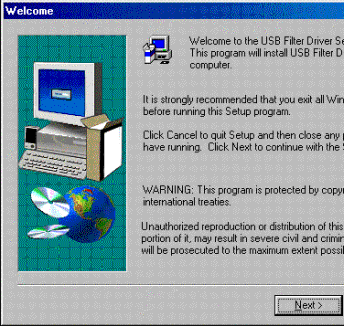
Click Next to continue the installation.
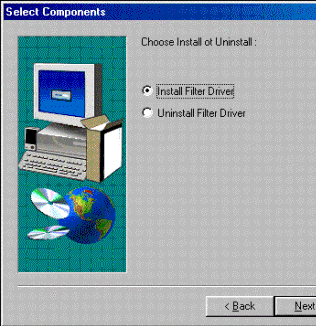
Verify that "Install Filter Driver" has a black dot in the
radio button.
Verify that "Yes, I want to restart my computer now" is
selected. Click Finish.
- If your USB device is still not working after installing the new
drivers and restarting your computer, plug the USB device into the
DSB-500 and restart the computer. Some USB devices won't work properly
unless they are detected when the computer boots up. Windows may display
the Add New Hardware wizard. Follow the installation procedure if the
Add New Hardware or other wizards are displayed.
|


