DI-701
Internet Server/Firewall
Frequently Asked Questions (FAQ)
Question #21: How to configure the DI-701 to input your username and password to dial through PPPoE?
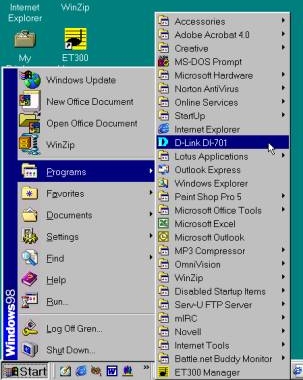
Step 1
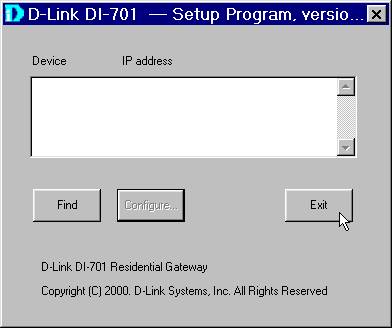
Click on Start>Programs>D-Link DI-701.
Step 2
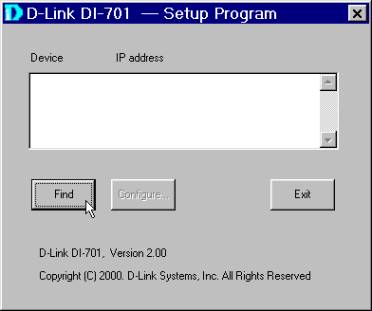
Click on Find
Step 3
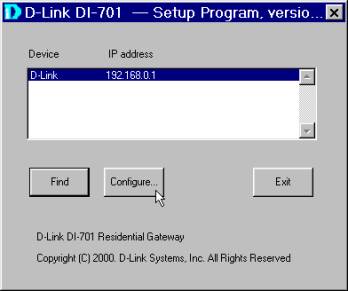
Click Configure.
Step 4
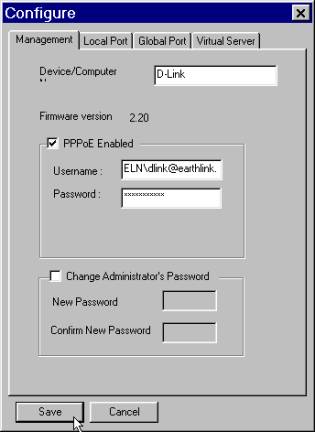
Input your computer name at the Device/Computer box. Check the PPPoE Enabled box. Enter ELN\ and then your username provided by your ISP at the Username box. >ELN\ must all be in capital letters entered before your username. Enter your password provided by your ISP and click Save.
Step 5
Click Exit.
Trouble shooting tips:
1. Make sure that your username and password are entered correctly.
2. Give your ISP a call if you forgot your username and password.
3. Make sure all your cable connections are properly installed and plugged into your PC as well as your DI-701.
Top
| 


